Saturday, 2 PM. Your venue is full, and the least popular attraction in the building is the front desk line. Every family in that queue is spending zero dollars, burning patience they’ll subtract from the visit — and someone at the back is quietly deciding to go somewhere else next weekend. A self-service kiosk attacks exactly that problem, which is why they’ve spread from fast food into FECs, trampoline parks and karting tracks. But a venue kiosk is a different machine from the one selling burgers, and buying the wrong kind is how kiosks end up unplugged in a corner. Here’s what they do, what they cost, and how to roll them out so guests actually use them.
What Is a Self-Service Kiosk? (Quick Answer)
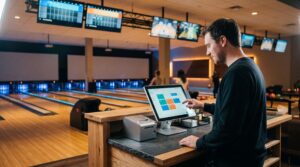
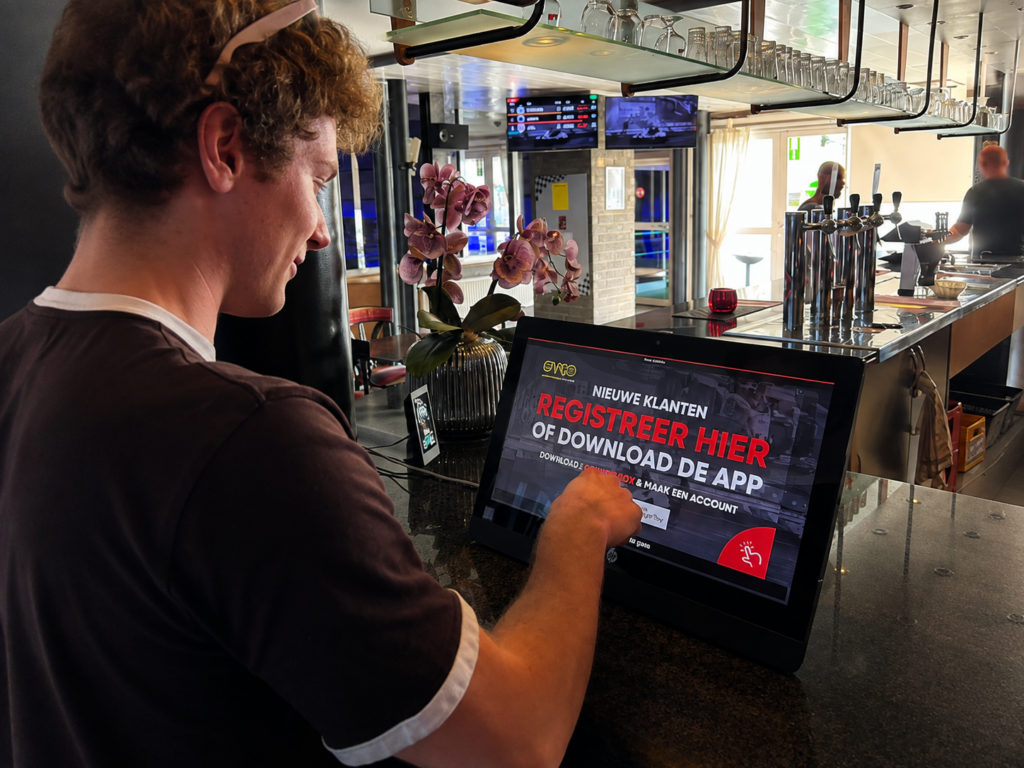
A self-service kiosk is an interactive touchscreen terminal that lets guests complete transactions without staff help. In an entertainment venue, that goes beyond ordering: kiosks handle guest registration and digital waivers, walk-in ticket sales against live capacity, F&B orders, and arcade card or wristband top-ups — all connected to the venue’s management platform.
A Venue Kiosk Is Not a Restaurant Kiosk
Most of what’s written about self-service kiosks assumes you sell food or retail items. An entertainment venue sells something harder: time, with conditions attached. That changes what the kiosk has to know:
| Restaurant / retail kiosk | Entertainment venue kiosk | |
|---|---|---|
| Sells | Items from a menu | Timed sessions, admissions, parties, game credits, F&B |
| Must check | Stock | Live session capacity — never sell a full 3 PM slot |
| Legal step | None | Digital waiver, signed and attached to the guest profile |
| Media handled | Receipt | RFID cards, wristbands, tickets — issued or topped up |
| Guest record | Optional loyalty | Required: waivers, session rights and history live on the profile |
That’s why the software question matters more than the hardware question for venues — a point we’ll come back to. First, the jobs.
The 5 Jobs a Self-Serve Kiosk Does in an Entertainment Venue
1. Check-in, registration and waivers
The single biggest queue-killer. Guests who booked online walk to a kiosk, confirm who they are, and sign or verify the digital waiver if it isn’t already on file — no clipboard, no re-typing names at the desk. Self-registration also builds the guest database with every check-in, which is where your marketing list actually comes from.
2. Walk-in tickets and sessions, sold against live capacity
A kiosk selling sessions must see the same availability as your website and front desk — the 3 PM jump session that’s down to four spots has to show four spots everywhere. That only works when the kiosk runs on the same booking engine and capacity data as the rest of the venue.
3. The self-ordering kiosk: F&B without the line
The classic restaurant use case, supercharged by venue context: parents order pizza from a self-ordering kiosk while the kids are still on the trampolines, the order routes straight to the kitchen, and it lands on the same guest tab as the session and the party deposit. For venues with table service, kiosk orders and table management need to share one screen in the kitchen — two order queues is how food gets slow.
4. Arcade card and wristband top-ups
If you run a game floor, top-up kiosks are where cashless systems earn their keep: guests reload credits without staff, and bonus-credit tiers (“load $50, get $60”) do the upselling automatically. We compared the four major cashless card systems separately — whichever you run, kiosk top-up support is a line to check in the contract.
5. Upsells that happen every time
Staff forget to offer the combo on a busy Saturday; the kiosk never does. Grip socks with every jump session, the photo package with every race, the meal deal with every party check-in — consistent prompts, no social pressure, and the guest decides at their own pace.
The Queue Math: What a Kiosk Actually Buys You
A staffed counter is a serialized resource: one transaction at a time, whatever the line looks like. Kiosks parallelize it — four kiosks next to one staffed till means five transactions happening at once instead of one, and the peak-hour line stops being your bottleneck attraction.
The honest version of the math: kiosks don’t remove staff, they redeploy them. The best rollouts we see move a team member from behind the counter to in front of the kiosks as a greeter — helping first-timers, catching waiver questions, and keeping the flow moving. The venue serves more guests with the same headcount, which is the real economics of self-service — the same logic behind our guide on selling more without adding staff. And for the guests still waiting their turn on the attraction itself, that freed-up staff time is exactly what powers better guest engagement.
The Upsell Math: Raising Spend per Guest
Square, which sells kiosks to restaurants, reports that customers typically purchase 10–30% more when ordering at a kiosk than with an employee — their figure, but consistent with what the entire QSR industry’s kiosk investment implies. The reasons transfer directly to venues: no line pressure, browsing at your own pace, and prompts that appear every single time.
The venue-specific twist is that your upsell menu is better than a restaurant’s: session extensions, bonus credit tiers, party add-ons, photo packages, merchandise. A kiosk that knows the guest just booked a birthday party can offer the pizza pre-order; one that sees a first-time racer can offer the second heat at a discount. That only works when the kiosk reads the same guest profile as everything else.
How Much Does a Self-Service Kiosk Cost?
As of 2026: Square lists basic kiosk hardware at roughly $1,000–$2,500 per unit and advanced systems at $3,000–$7,000+; Kiosk Group notes tablet-based setups starting under $1,000 versus legacy enclosures at $10,000–$20,000. Add software licensing or subscription, payment terminal, printers or RFID peripherals, installation, and support.
Three cost lines that venue buyers underestimate:
- Peripherals. A venue kiosk usually needs more than a screen: an integrated payment terminal, a receipt or ticket printer, a scanner, and — for game floors — an RFID reader or card dispenser. Each adds hardware cost and a service contract.
- Software. Kiosk software is licensed per device, one-time or subscription. If it’s a module of your venue platform, price it inside that contract; if it’s standalone, price the integration work too.
- The second kiosk. One kiosk proves the concept; queues die when there are enough of them that walking up is always faster than lining up. Budget the rollout, not the pilot.
Hardware: Freestanding, Countertop or Wall-Mount?
Form factors are the easy decision. Freestanding units own the entrance and handle check-in traffic; countertop and wall-mount units fit F&B corners and game floors; all modern options are tablet- or touchscreen-based with secure enclosures. Pick positions before models: a kiosk guests walk past without noticing is furniture. The entrance needs check-in kiosks visible from the door; the arcade floor needs top-up points where credits run out; the café needs ordering screens where the smell of pizza does the marketing.
The Software Decision: A Window Into Your Venue, or an Island?
Here’s the part that decides whether your kiosks get used or unplugged. A standalone kiosk app can take an F&B order — and if you run a pure food operation, a standalone product is a legitimate choice. But the five jobs above have one thing in common: they all require the kiosk to know the venue — live capacity, guest profiles, waiver status, card balances, party bookings. An island kiosk can’t do any of that, and retrofitting integrations after purchase is where kiosk projects go to die.
Full disclosure: this is the part of the market we’re in. Our Self-Serve Kiosk is a module of the BMI Leisure platform, so it sells reservations across multiple activities, takes payment on integrated terminals, and drives scanners, printers and RFID readers — with workflows that change by location, whether the kiosk lives at the entry, on the arcade floor or at the bar. Spanish trampoline group Salting runs that model across five high-traffic centers. Judge it against any alternative with one question: does the kiosk see the same live venue as the front desk?
Rollout: 6 Mistakes That Kill Kiosk Adoption
- Hiding them. Kiosks belong in the natural walking line from the door, angled so screens are visible. If guests reach the counter first, the kiosk loses every time.
- No greeter in week one. The first two weeks decide guest habits. One team member actively walking people to the kiosk converts skeptics permanently.
- Replicating the full menu. A kiosk flow should be shorter than the counter conversation — top sellers first, three taps to payment. Edge cases go to the staffed till.
- Ignoring the guests who can’t or won’t. Square itself flags the drawback: touchscreen-only flows can exclude elderly guests and guests with disabilities, and some people simply prefer a human. Keep a staffed lane open — always.
- Forgetting the waiver. If the kiosk can’t capture or verify waivers, your biggest queue (check-in) stays exactly where it was.
- Not measuring. Kiosk share of transactions, average ticket vs. counter, top-up frequency — the numbers live in your POS reports, and they tell you where kiosk #3 should go.
See What a Kiosk Can Do When It Knows Your Whole Venue
Check-in with waivers, session sales against live capacity, F&B orders and card top-ups — one kiosk, one guest profile, one platform. Explore how the BMI Leisure Self-Serve Kiosk works.
Explore the Self-Serve KioskFrequently Asked Questions
What is a self-service kiosk?
An interactive touchscreen terminal that lets guests complete transactions without staff help. In an entertainment venue, that goes beyond ordering: kiosks handle guest registration and digital waivers, walk-in ticket and session sales against live capacity, food and beverage orders, and arcade card or wristband top-ups — all connected to the venue’s management platform.
How much does a self-service kiosk cost?
As of 2026, Square lists basic self-serve kiosk hardware at roughly $1,000–$2,500 per unit and advanced systems at $3,000–$7,000+, while Kiosk Group notes tablet-based solutions starting under $1,000 versus legacy enclosures at $10,000–$20,000. On top of hardware, budget for software licensing or subscription, payment terminals, printers or RFID peripherals, installation and support.
Do guests actually use self-service kiosks?
Most do, when kiosks are placed well and the flow is short — and Square reports customers typically purchase 10–30% more when ordering at a kiosk versus with an employee. But not everyone: some guests prefer a person, and touchscreen-only flows can exclude elderly guests or guests with disabilities. Successful venues run kiosks alongside a staffed counter, not instead of one.
What does an entertainment venue kiosk need that a restaurant kiosk doesn’t?
Four things: digital waiver capture tied to the guest profile, live session and capacity awareness so it never sells a full time slot, RFID and card handling for arcade credits or wristbands, and workflows that change by location — entry, arcade floor or bar. A restaurant kiosk sells items; a venue kiosk has to know the whole operation.
Sources
- Square — Self-Serve Kiosks for Businesses: What They Are and How They Work (definition, benefits, 10–30% higher purchase claim, cost ranges, accessibility drawbacks). squareup.com — verified August 4, 2026.
- Kiosk Group — Self-Service Kiosks 101 (form factors, hardware components, peripherals, tablet vs. legacy cost structure). kioskgroup.com — verified August 4, 2026.
- BMI Leisure — Self-Serve Kiosk feature page (multi-activity reservations, integrated payment terminals, scanner/printer/RFID support, per-location workflows). bmileisure.com — verified August 4, 2026.
Cost figures reflect the cited sources’ published pages as of August 4, 2026 and may change — request current quotes during your evaluation. BMI Leisure is the publisher of this guide and sells a self-serve kiosk module as part of its venue management platform; we’ve disclosed that above, and the standalone-kiosk alternative is acknowledged where it genuinely fits. Last updated: August 4, 2026.